What's working well
Strong media, strong brand.
- Beautiful homepage video that communicates the mission.
- Strong copy and consistent branding.
- Optimized mobile version with good readability.
- High quality imagery throughout.
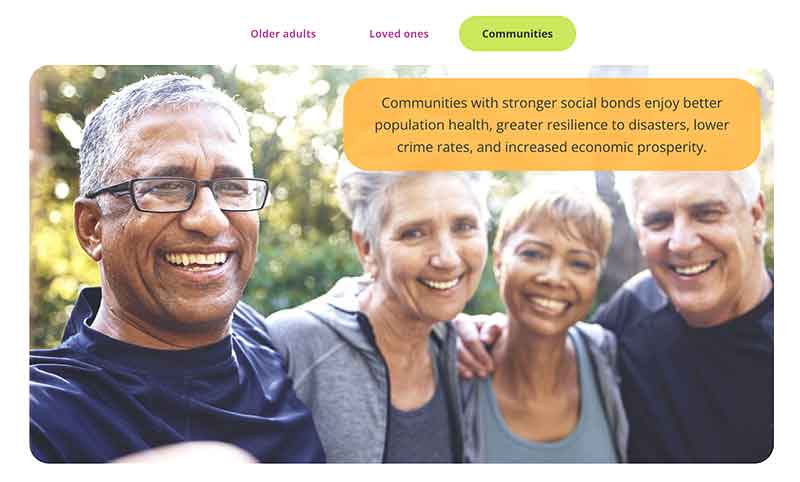
Four big opportunities
1. Navigation
The menu is more complex than it needs to be, and can be simplified for immediate clarity. The main nav should guide people into parent pages, rather than present every option.
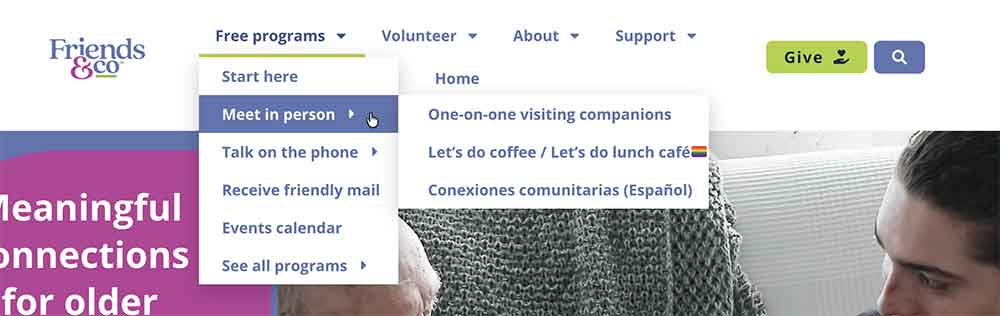
The menu structure hides what's on offer
“Free programs”, “Talk on the phone” and “See all programs” are clickable links to # that go nowhere. “Start here” and “Meet in person” both open the Friendship Services page. Each link deserves a unique destination.
The menu runs three levels deep, with fly-out panels that need precise mouse control. This is the hardest to navigate, especially for an older audience.
Every program appears twice, under two different names
The “Free programs” menu lists the programs by description, then “See all programs” at the bottom lists the same six again by name. A visitor cannot tell that these are the same thing.
About and Volunteer carry items that don't belong
The About menu holds items that can be folded into parent pages - Annual reports and the 990. Contact can move to the footer. Volunteer Portal is handled by the footer. Latest News deserves to be it's own nav category.
Smaller snags in the same menu
- “Home” is the last item and wraps onto its own row on desktop. The logo already links home.
- “Refer an older adult” is not in the menu at all.
- Because programs are listed twice, two menu items are marked as the current page at once - screen readers announce both.
- “Most recent 990” opens a PDF with no warning.
Navigation solution
Impact: High · Effort: Low
Rename the main menu item - “Friendship Programs” or “Free Friendship Programs” - link it to the overview page, and list what is available directly underneath. One list, one name per program, with a plain description beside each name.
Proposed Main Navigation
- Free Friendship Programs (opens the overview page)
- Visiting Companions: in-person visits
- Phone Companions: weekly one-on-one calls
- Coffee Talk: drop-in calls, Tuesday and Thursday
- Cards Connect: friendly mail
- Let’s Do Lunch and Coffee: LGBTQ+ gatherings
- Conexiones Comunitarias: en español
- Events calendar
- Refer an older adult
- Volunteer
- About
- Stories
2. Homepage Hero
The homepage misses an opportunity to land the mission statement on first impression.
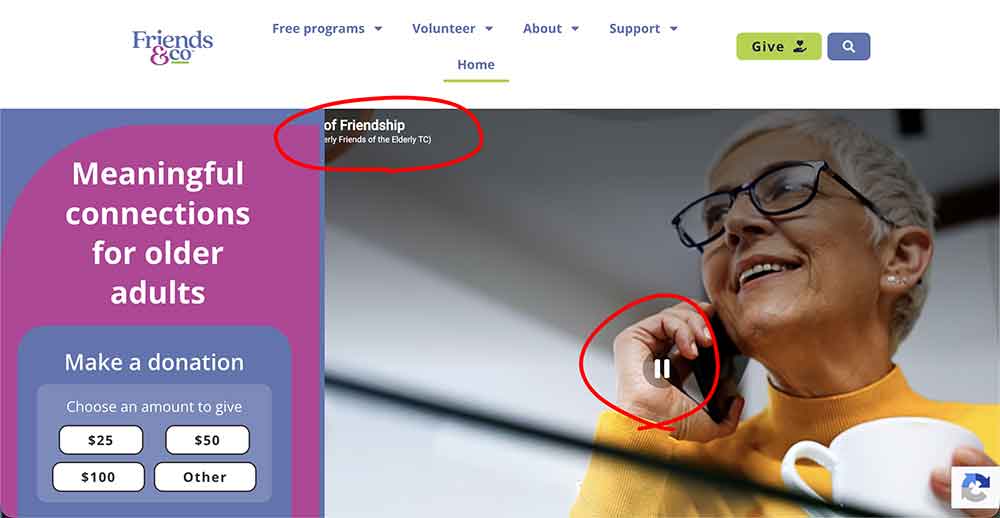
The homepage prioritizes a donation form that competes with the video, weakening both
The video is one of the site's best assets and explains the mission well, but here its story is never heard: it plays muted with a non-functioning pause button, and the captions create visual noise.
The mission statement sits below the donation callout
The only action in the first screen is choosing a donation amount. The sentence that explains the mission - “We bring people together to reduce loneliness and build meaningful friendships” is hidden below it.
A clear presentation of the mission and offer will help donors give more readily.
Homepage solved
Impact: High · Effort: Medium
Let the first screen answer “what is this, and is it for me?” Then let the video shine with sound and captions.
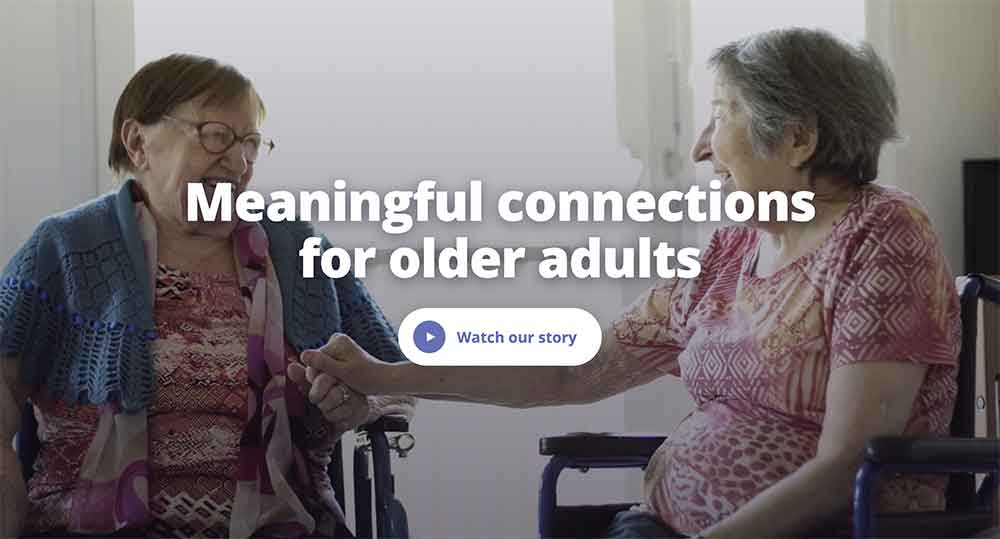
Proposed Homepage Hero
- The mission sentence - Meaningful connections for older adults - as a strong full page headline with a caption-free still (or autoplaying clip) of the video behind it
- A large play button "Watch our story" that opens the video with sound and captions.
- Move the donation call to action below the hero section, paired with the main mission statement - We bring people together to reduce loneliness and build meaningful friendships.
3. Donation flow
The main opportunity is clarity and a consistent flow to the donation form. The donation page itself has no imagery or mission statement - this is where the best assets should live.
The Give button is not a primary action
Give and search sit side by side as two filled buttons of the same size, with Give at a lower contrast. Neither reads as the main action, and the “Support” item (with four pages under it) competes beside it.
Highlighting "Give" as the main call to action - with cohesive language throughout - will ground the donation flow.
The story and the form live on different pages
The Support page has all the best assets with a photo, the “You belong with us” story, the impact numbers, and a donor quote. The Donate page has the form and a single impact statement but very little else.
Support pages have no clear hierarchy
Support Friends & Co - the Story, stats, quote. Links out to the four other pages including Other ways to give which has six options, each ending with the same contact block.
It's unclear which way of giving the site wants to lead with. Support pages could benefit from a breadcrumbs navigation to more easily travel through the full scope of options.
Smaller snags across the support pages
- The “Donate now” button on the Other Ways to Give page goes to a 404 page.
- The same destination is labelled Give, Give today, Donate today, Donate now, Learn more and Support Today.
The donation form itself
- The design could use an update - Modern forms lead with a "Give Once / Monthly" option, rather than a final choice before payment.
- Best practices include Express options with Apple Pay, Google Pay and Paypal.
- Two controls for every choice: radio circles plus buttons for frequency, radio circles inside boxes for the amounts.
- “Re-enter email” adds typing without catching many errors.
- The styling doesn't match the site: yellow background, grey fields, default radios.
Donation flow solution
Impact: High · Effort: Medium to High
One clear door, and the best story told right beside the form.

Proposed Donation Flow
- “Support” leaves the menu. “Give” gets more design impact in the header. See above image.
- Search becomes a simple icon, with a label for screen readers.
- The Give page opens with the dollar amounts and form, beside a strong photo, one impact line and a donor quote.
- The donation form takes on the colors and branding of the rest of the site.
- A “More ways to give” band below the form: monthly giving, planned giving, sponsorship, stock and donor-advised funds.
- One phrase everywhere for cohesion: “Give” or perhaps “Support our mission”.
- Move the donation amounts out of the hero and into a support section just below it that calls out the ways to give.
- The Support page redirects to the Give page.
- Corporate sponsorship and Other ways to give become sections of the Give page.
A modern donation form
- Amount and frequency together at the top, monthly as the friendly default, an impact line under each amount.
- Mobile wallets and PayPal beside the card field, all on one screen.
- Invisible fraud protection instead of a checkbox captcha.
- Styled to the brand, with a photo and a donor quote beside it.
4. Stories
The News section is one of the site's strongest assets. It's not featured on pages where people decide to join, volunteer or give.
One stream holds six kinds of content
The news page mixes donor impact stories, announcements, an explainer about the name change, TV coverage, event recaps and Volunteer of the Month in a single grid. Each card shows a title and “Read more”, with no category, date or summary.
The posts could be featured better
“Latest news” is the fifth item under About. It also goes by four names: “Latest news” in the menu, “Latest Happenings” as the page heading, “News” in the browser tab, and linked as “See latest happenings archive” on the homepage.
Press, reports and video have no home, and deserve their own pages
Press coverage is split between the homepage logo strip, which opens PDF tear sheets, YouTube and MPR, and individual news posts. The Community Resource Guide are valuable resources, but sit at the bottom of the news grid where older adults and caregivers may not look.
Stories solution
Impact: Medium to High · Effort: Low to Medium
Tag each story once, then let it show up wherever it helps someone decide.
Proposed Stories Solution
- “Stories” in the main menu, with one name used everywhere (or “News” or "Latest Happenings")
- Five categories: impact stories, volunteer spotlights, events, in the news, announcements
- Cards show a category, a date and a one-line summary
- An “In the news” page that the homepage logos link to
- The Resource Guide sits with Friendship Services. Reports sit with the annual reports.
- Each program, volunteer and giving page shows its own latest story
- “Because of you, Susan has someone to call” on the Phone Companions page and beside the donation form
- Volunteer of the Month on the volunteer pages
- The Pride luncheon recap on the Let’s Do Lunch and Coffee page
Summary of findings by impact and effort
| Finding | Area | Impact | Effort |
|---|---|---|---|
| Simplify the main menu into one “Free Friendship Services” list | Navigation | High | Low |
| Add “Refer an older adult” to the menu and remove “Home” | Navigation | Medium | Low |
| Make Give the one primary button and fold “Support” into it | Donation | High | Low |
| Lead the homepage with the mission statement | Homepage | High | Low |
| Rework the homepage video: clean background, “Watch our story” button | Homepage | High | Medium |
| Move the donation amounts into a support section below the homepage hero | Donation | High | Medium |
| Combine the Support story with the donation form on one Give page | Donation | High | Medium |
| Reduce five support pages to two and publish the advisor details | Donation | Medium | Medium |
| Fix copy and link errors on the support pages, and use “Give” everywhere | Donation | Medium | Low |
| Replace the donation form: frequency and amount first, fewer fields, mobile wallets, no captcha | Donation | High | High |
| Move news into the main menu under one name | Media | Medium | Low |
| Add categories, dates and summaries to news posts | Media | Medium | Low |
| Show related stories on program, volunteer and giving pages | Media | High | Medium |
| Create an “In the news” page for press coverage | Media | Medium | Low |
| Give the video its own page | Media | Medium | Low |